
Small Business Control Center · Essentials Edition
Take control of your business from one single system
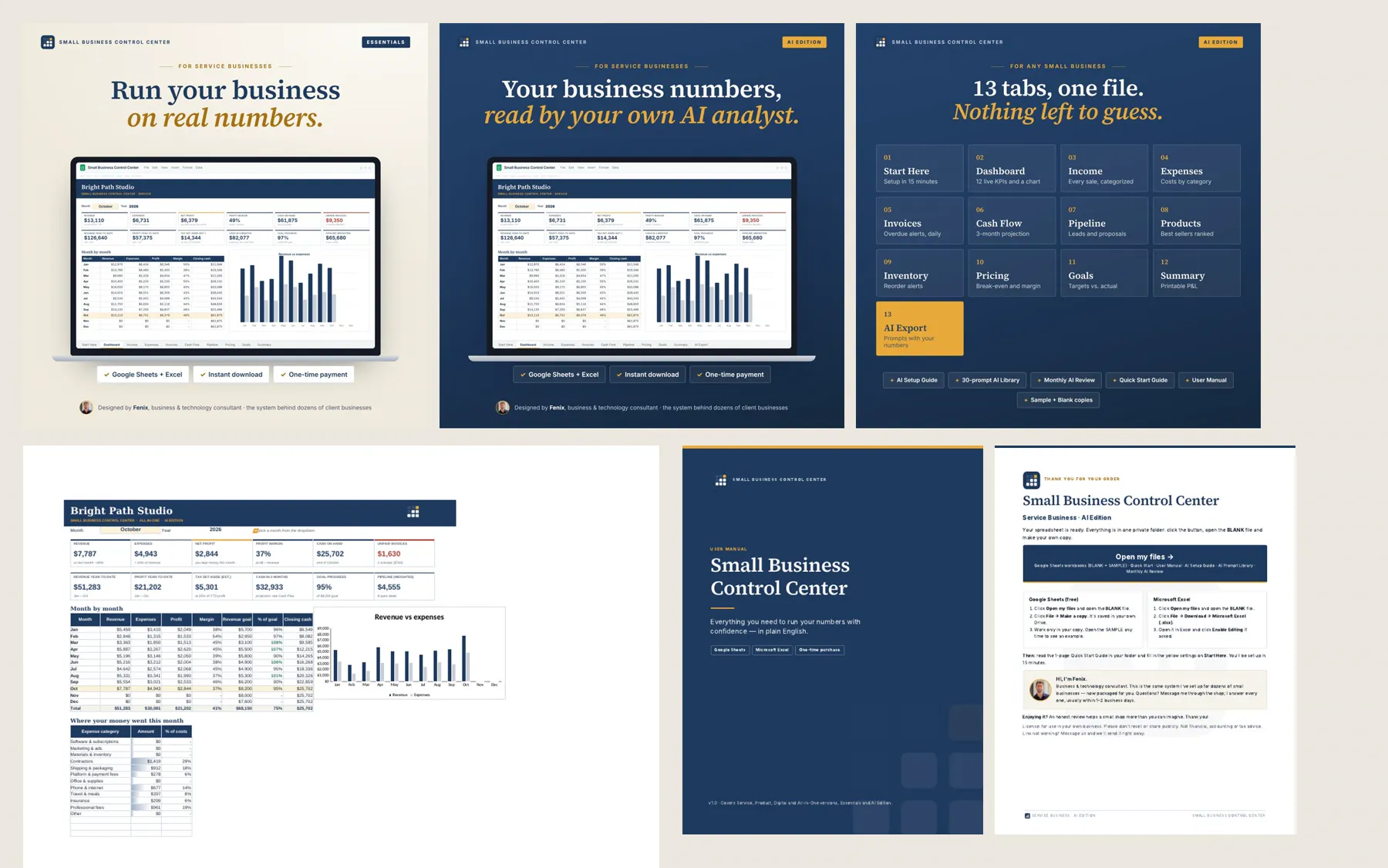
One connected workbook for your sales, invoices, expenses, inventory, pricing and cash flow. You fill in the yellow cells and the dashboard, reports, forecast and alerts update on their own.
$19 · One-time payment · Instant download
Real screenshots · sample business with fictional data
▶ Watch the full walkthrough video (opens on YouTube).
- ✓ Excel and Google Sheets
- ✓ Up and running in about 10 minutes
- ✓ Plain English, no jargon
- ✓ One-time payment, no subscription
The problem it solves
Today
- You make money, but at the end of the month you don’t know where it went.
- Unpaid invoices, expenses and stock live in different places (or in your head).
- You set prices and decide purchases by gut feeling because the numbers aren’t at hand.
With Small Business Control Center
- One connected system, not loose templates: what you enter on one tab feeds the dashboard, the alerts, the forecast and the reports
- You see what you earn, who owes you and how much cash you will have
- You set prices and decide purchases with your numbers in front of you
What’s included, by area
What it looks like inside
Real screenshots of the workbook, with a sample business and fictional data. Tap any of them to see it full size.
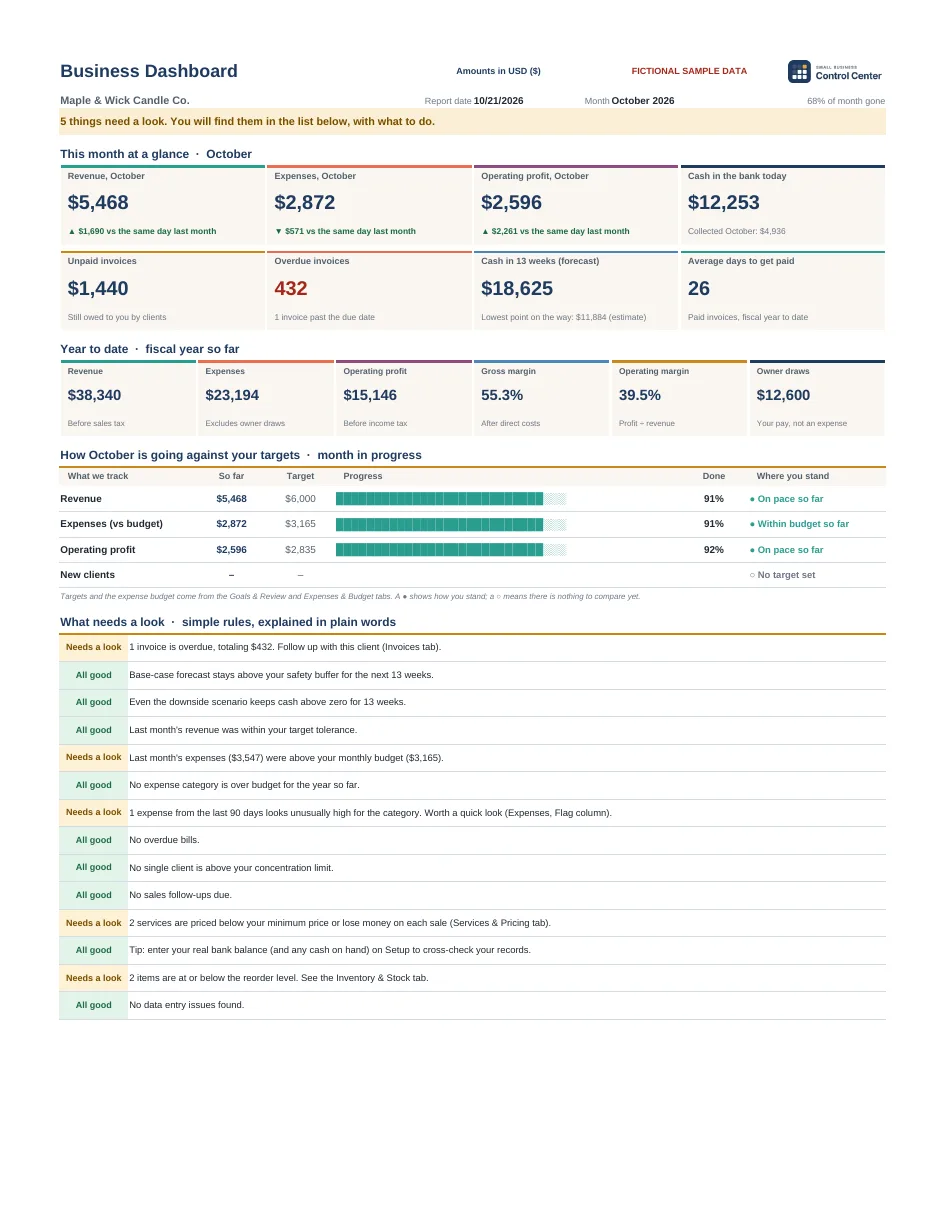 Business DashboardYour month at a glance, year to date, your targets and what needs a look, in plain words.
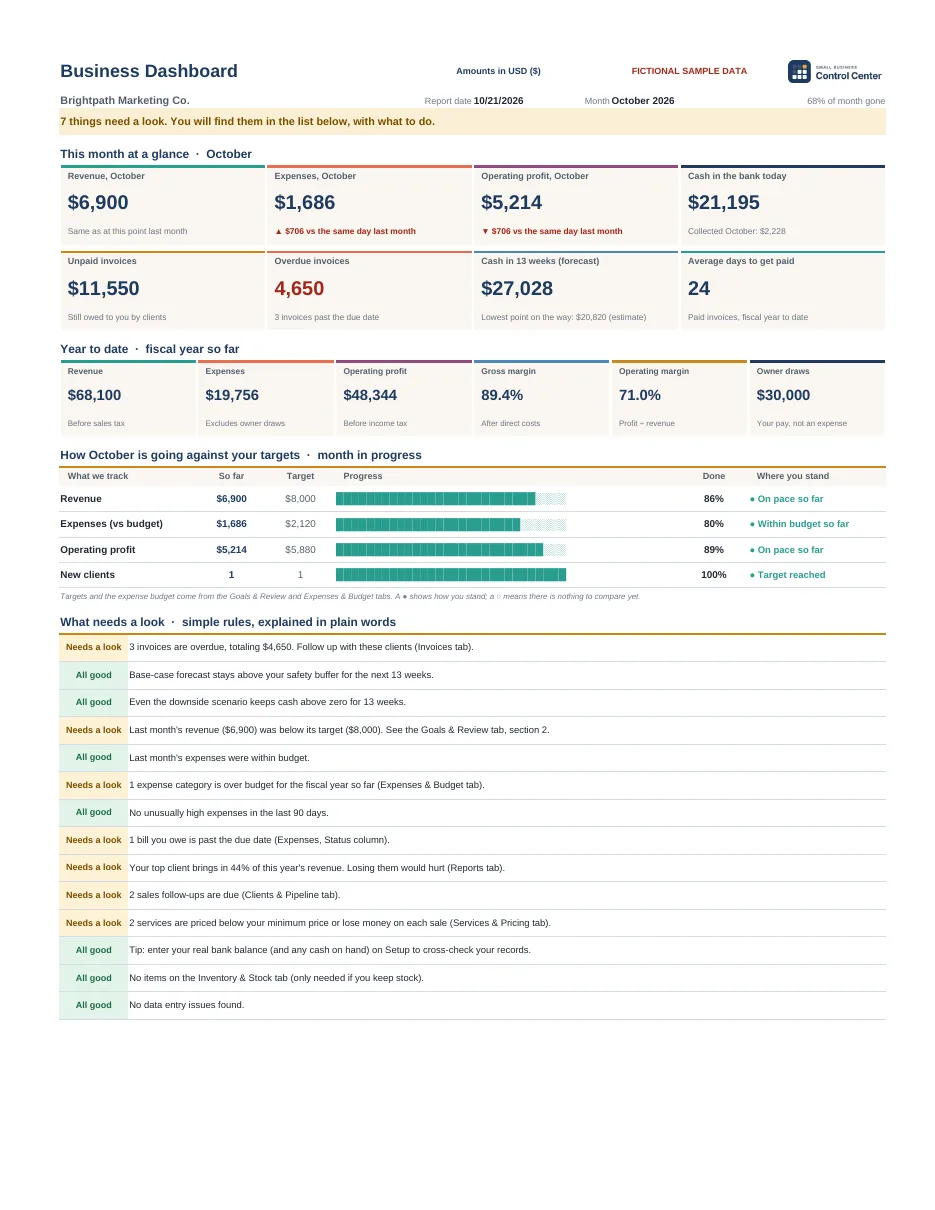 Same dashboard, a service businessOverdue invoices, sales follow-ups due and services priced below your minimum.
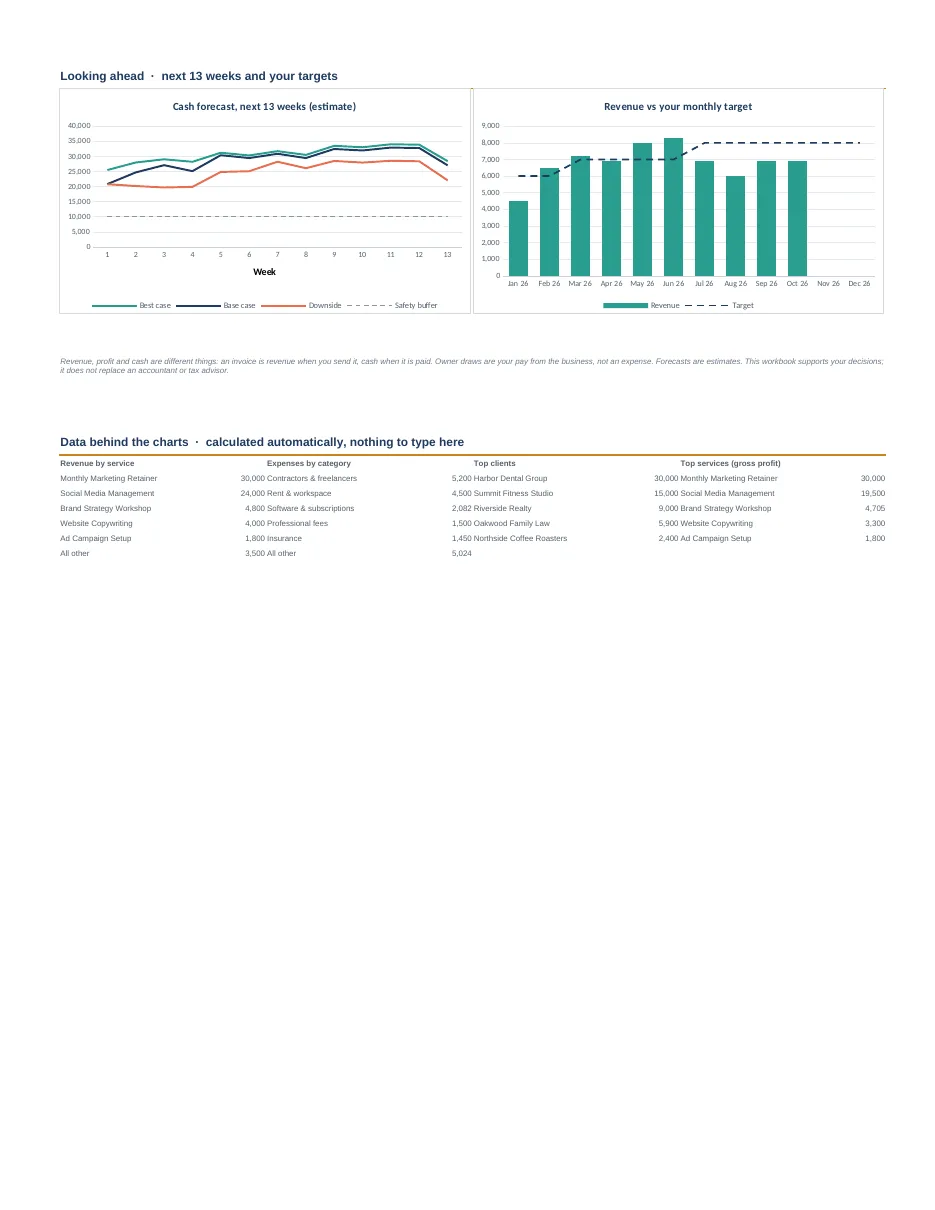 Your cash for the next 13 weeksBest, base and downside scenarios against your safety buffer, and revenue vs. your monthly target.
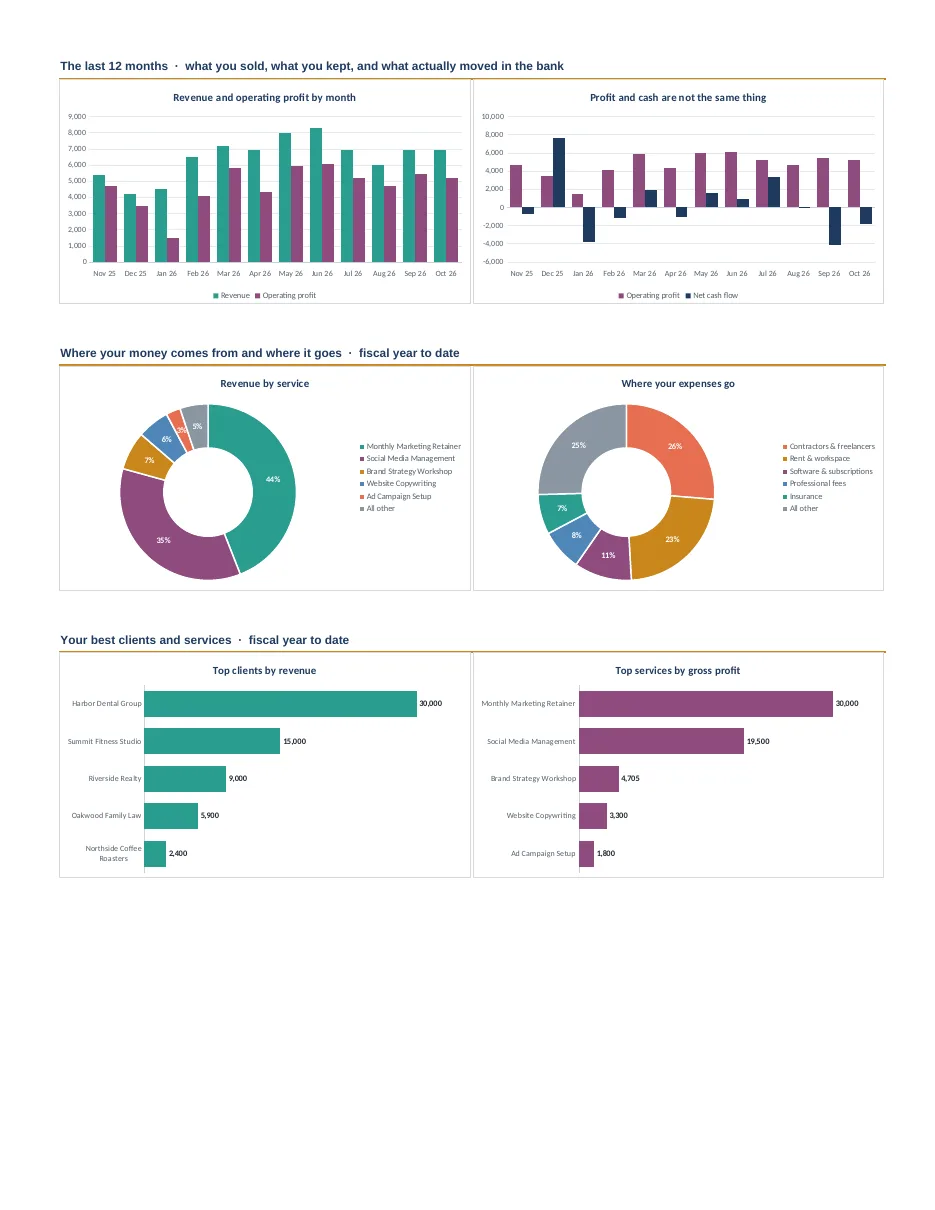 The last 12 monthsWhat you sold, what you kept, what moved in the bank, and your best clients and services.
What you get
- Workbook with 20 connected tabs (Excel and Google Sheets)
- 3 sample workbooks with fictional businesses, so you can see it working before you start
- 7 PDF guides: Start Here, Quick Start, User Manual, Metrics Glossary, FAQ, Monthly Review Worksheet and License
- A 12-minute video tutorial
- Free bonus guide “Your Internal Advisor”: how to review your workbook with Claude, an AI assistant. Claude is a separate Anthropic product with its own account: it isn’t included and the guide isn’t affiliated with Anthropic.
Three complete sample businesses
They come filled in with fictional businesses so you can see the system working before you add your own data.
What you need to know
- You don’t need to know accounting: you enter your sales, invoices, expenses and stock in the yellow cells.
- If you can open a file and type in a cell, you can use it. The formulas are already built.
- It works best on a computer. You can view it on your phone, but entering data is easier on a computer.
Excel and Google Sheets
- Microsoft Excel 2019, 2021, 2024 or Microsoft 365 (Windows or Mac), or Google Sheets (free with a Google account).
- Not compatible with Excel 2016 or earlier, or Apple Numbers.
- 25 currencies to choose from on the Setup tab, with US dollars as the default. The workbook doesn’t convert between currencies.
- No macros, add-ins or subscription. Your data stays in your own file.
Works with the tools we recommend
Small Business Control Center works with the tools we recommend: each one does its part and your numbers stay in one place.
Your business in one Excel or Google Sheets workbook: sales, expenses, invoices, cash and alerts.
See the systemSmall Business Control Center works in Google Sheets, included in Google Workspace: you keep it in Drive and share it with your partner or your accountant.
See use casesSmall Business Control Center is a management and internal control tool. It does not replace your invoicing or accounting software, your accountant or tax advisor, or any certified invoicing software your country’s law may require.
Essentials Edition
Small Business Control Center Essentials
One connected workbook for your sales, invoices, expenses, inventory, pricing and cash flow. You fill in the yellow cells and the dashboard, reports, forecast and alerts update on their own.
Sold on Gumroad: you get the files right away by email and in your Gumroad library. Launch discount: applied automatically at Gumroad checkout. No code needed.
Frequently asked questions
Will it work for my type of business?
It’s built for small businesses that sell products or services: shops, makers, cafés, salons, cleaners, tutors, consultants, freelancers and agencies. It works whether your customers pay at the time of sale, get invoices, or both.
Does it create invoices or file taxes?
No. It’s a management and internal control tool: it tracks the invoices you send from your own invoicing tool. It doesn’t replace your invoicing or accounting software or your accountant.
Does it connect to my bank or my online store?
No. It doesn’t connect to banks, Square, Shopify or Etsy: you enter or paste your numbers.
What currency does it use?
You pick from 25 currencies on the Setup tab; US dollars is the default.
Are the guides and videos in English?
Yes. The workbook, the guides and the video tutorial you receive are in English.
Your business, under control starting this week.
$19, one-time payment, in plain English.
Buy for $19 →Looking for something else? See Small Business Control Center AI Edition or compare the two editions.